Loading...
Loading...
Loading...
Loading...
Loading...
Loading...
Loading...
Loading...
Loading...
Loading...
Loading...
Loading...
Loading...
Loading...
Loading...
Loading...
Loading...
Loading...
Loading...
Loading...
Loading...
Loading...
DOSafe: Create Your Ideal Wallet with Ease
https://docs.avax.network/apis/avalanchego/apis/info
https://docs.avax.network/apis/avalanchego/apis/health
tail .avalanchego/logs/main.log
if the logs file contain these lines:
[04-17|15:50:45.332] INFO server/server.go:269 adding route {"url": "/ext/bc/22v7AG7h6qaVxd4bLvAsSsg2LZ4RCn5iVYgFn7a2Fj1LCuYwjv", "endpoint": "/rpc"} [04-17|15:50:45.332] INFO server/server.go:269 adding route {"url": "/ext/bc/22v7AG7h6qaVxd4bLvAsSsg2LZ4RCn5iVYgFn7a2Fj1LCuYwjv", "endpoint": "/ws"}
You will find this line:
ERROR node/node.go:849 failed to register VM {"vmID": "X5tFvg9JwoXgaYPQbceSzhGoCF6dhwrDm5BnAav6meFp3xxmg", "error": "handshake failed: vm process not found"}
curl -X POST --data '{
    "jsonrpc":"2.0",
    "id"     :1,
    "method" :"info.getNodeID"
}' -H 'content-type:application/json;' 127.0.0.1:9650/ext/info
sample output:
{ "jsonrpc": "2.0", "result": { "nodeID": "NodeID-5mb46qkSBj81k9g9e4VFjGGSbaaSLFRzD", "nodePOP": { "publicKey": "0x8f95423f7142d00a48e1014a3de8d28907d420dc33b3052a6dee03a3f2941a393c2351e354704ca66a3fc29870282e15", "proofOfPossession": "0x86a3ab4c45cfe31cae34c1d06f212434ac71b1be6cfe046c80c162e057...." } }, "id": 1 }
curl -X POST --data '{ "jsonrpc":"2.0", "id" :1, "method" :"health.health" }' -H 'content-type:application/json;' 127.0.0.1:9650/ext/health
Your should see the words "healthy": true in the response object.
Founded by industry veterans, DOS Labs is focused on elevating the Web3 gaming experience for both players and developers.
DOS Chain official roadmap
You can also find the feature roadmap and share your suggestion at:
DOS Chain Block Explorer
Our self-hosted explorer doscan.io offers a suite of powerful tools designed to help you track transactions, analyze DOS usage statistics, and access detailed information about validators.
Search using address, transaction hash, or block ID
Delve into detailed transaction information
Access, verify, and interact with smart contract source codes
A Beam Testnet Explorer is also available: .
Access the Snowtrace Explorer for DOS at , which offers tools for enhanced blockchain interaction:
View transactions, statistics, and validator details
Search using an address, transaction hash, or block ID
Explore details about ERC20, ERC721, and ERC1155 tokens
Delve into detailed transaction information
DOS Chain is more than just a gaming blockchain—it’s a scalable, AI-driven Web3 ecosystem that empowers gamers, developers, and content creators to shape the future of gaming. As a dedicated Avalanche subnet, DOS Chain delivers gasless transactions, sub-second finality, and AI-enhanced security, ensuring seamless Web3 integration for both players and developers.
DOS Chain operates as an independent gaming-focused Layer-1 blockchain while benefiting from the speed, security, and interoperability of Avalanche’s infrastructure. This enables a high-performance, low-latency gaming experience without sacrificing decentralization or accessibility.
A blockchain validator is someone who is responsible for verifying transactions on a blockchain. Once transactions are verified, they are added to the distributed ledger. In proof of stake (PoS) systems like DOS Chain, our validators are given as long as they correctly participate in the network. This mechanism helps secure the network by imposing the need to lock up value in the network in order to participate in the consensus decisions.
Validators will form the backbone of our DOS network. Each validator processing transactions and participating in consensus will enable DOS to become the most secure and safe network in the world.
A Subnet requires validators that secure both the Subnet, and the primary network (X,P, and C chain). It is up to the node operator to ensure the optimal health of the node.
NT Marketplace on DOS Chain
OverMint is DOS's designated marketplace for buying, selling, and discovering unique gaming Non-Fungible Tokens (NFTs). It serves gamers and enthusiasts eager to exchange in-game assets from their favorite titles, including weapons, characters, cosmetics, accounts, and certificates of ownership. Designed with a seamless user experience, OverMint emphasizes its assets, enabling users to acquire their desired items swiftly.
Explore DOS's native marketplace at .
Access, verify, and interact with smart contract source codes
DOS is an incredibly lightweight network, so nodes can run on commodity hardware. Note that as network usage increases, hardware requirements may change.
CPU: Equivalent of 8 AWS vCPU
RAM: 16 GB
Storage: 1 TB
OS: Ubuntu 20.04 or MacOS >= 12
When a Validator is done validating the transaction it receives a reward for helping to secure the network by validating. A validator only receives a validation reward if it is sufficiently responsive and correct during the time it validates. A validator must maintain at least an 80% uptime to receive rewards.
To be able to validate DOS Chain, the node must have a validator of Avalanche Network.
To learn more about Validators on Avalanche, please read the following article.
Learn More
🚀 Zero Gas Fees – All whitelisted smart contract functions on DOS Chain are gasless, making Web3 gaming affordable and frictionless.
⚡ Sub-Second Finality – Transactions are confirmed instantly, allowing real-time in-game interactions and smooth multiplayer experiences.
🔗 Scalability & Interoperability – DOS Chain processes 4,500+ TPS, with the potential to scale further by adding more L1s or cross-chain bridges.
🤖 AI-Driven Web3 Experience – DOS Chain integrates AI-powered smart wallets, risk detection, automated asset management, and NPC AI agents, making blockchain security and usability effortless.
🎮 Gaming-Optimized Infrastructure – Supports EVM compatibility, Unity & Unreal Engine SDKs, and a plug-and-play Web3 toolkit for developers.
🌍 Multi-Chain & Cross-Game Compatibility – DOS Chain enables game asset interoperability, allowing NFTs and in-game currencies to move seamlessly between games.
🛡️ Enhanced Security & Decentralization – Provides stronger security guarantees than standard PoW or PoS while maintaining a user-friendly gaming experience.
$DOS is the native token powering transactions, governance, and in-game economies within the DOS Chain ecosystem. Key utilities include:
💰 Gasless Gaming – Enables frictionless interactions within Web3 games and applications. 🎮 Interoperability – Used as a unit of account across multiple games, ensuring seamless cross-game transactions. 🗳 Decentralized Governance – Holders of $DOS can participate in on-chain governance, influencing the future of DOS Chain. 🚀 Staking & Rewards – Supports validator incentives, GameFi staking models, and community-driven rewards.
DOS Chain is more than just a blockchain—it’s a comprehensive gaming ecosystem designed to support Web3 game development, NFT trading, and decentralized identity solutions:
🎮 OverMint – A gasless NFT marketplace for in-game assets and collectibles. 🔥 MetaDOS – AAA Battle Royale game showcasing DOS Chain’s high-performance gaming capabilities. 🔍 DOScan – A blockchain explorer providing real-time transparency. 👤 DOS Me – A Web3 identity and account abstraction service. 🔐 DOSafe – A non-seed phrase AI-powered Web3 wallet for security and convenience. 💱 DOSwap – A Web3 finance service enabling cross-chain transactions and decentralized trading.
DOS Chain aims to become the world’s most accessible and scalable Web3 gaming platform. By leveraging AI, blockchain technology, and seamless interoperability, we are building the foundation for the next generation of interactive gaming experiences.
🌍 Permissionless & Decentralized – Anyone can build and play without restrictions. 🔗 Multi-Chain Expansion – Bridging to Ethereum, Avalanche, and other Layer-1/Layer-2 networks.
Contact Us: [email protected]
Social Channels: https://dos.me/DOS


DOSafe is a white-label solution that offers full control over the developer experience, allowing you to own the npm package a developer installs.
Efficient User Management: Acts as a gatekeeper ensuring only authorized users gain access.
Effortless Wallet Setup: Users can create, fund, and use wallets easily.
Universal Compatibility
Supports browsers, mobile platforms, and Unity for seamless development.
Explore these popular guides to begin.
Integrate an Ecosystem Wallet with Wagmi: Learn how to integrate an ecosystem wallet seamlessly using Wagmi.
Wallet Connectors: Utilize an ecosystem wallet with popular wallet connectors to enhance your user experience.
Set Up Your DOSafe Wallet: Follow this step-by-step guide to create your own wallet.
This document serves as a starting point for new users to the DOS Chain ecosystem. General knowledge of cryptocurrency is assumed, and in particular familiarity with the Ethereum or Avalanche ecosystem. If you don't understand something right away, that's OK. Search for an answer online, and if you don't find it, ask on our .
DOS Chain utilizes the L1s technology of Avalanche. Before you start developing DApps on the DOS Chain, it is important to learn about its underlying architecture.
An Avalanche L1 is a sovereign network which defines its own rules regarding its membership and token economics. It is composed of a dynamic subset of Avalanche validators working together to achieve consensus on the state of one or more blockchains. Each blockchain is validated by exactly one Avalanche L1, while an Avalanche L1 can validate many blockchains.
Features
Status
Authenticate
✅
Third-party auth support
✅
Embedded wallet
✅
Smart wallet infrastructure
✅
Mobile Wallet Protocol compatible
✅
Themes and customization
✅
DOS Chain has partnered with Openfort to provide the end-users and developers a better experience on Web3. DOS Chain tools are built on public goods infrastructure like the ERC-4337 or ERC-6551 standards, which are scalable and make them simple to use.
DOSafe, our ecosystem wallet, is not a 1-to-1 mapping of any wallet solution you've seen. While we offer many of the features that other solutions have, we go much further than anyone else because: (1) We're based on smart accounts not EOAs, and (2) we build the server stack so you don't have to worry about the reliability of the infrastructure.
DOSafe consists of modules that allow you to plug-and-play the tools to achieve your success.
Our infrastructure orchestrates everything under the hood to make the development and maintenance easy. The 4 key components we take care of are:
Smart accounts: We offer optimized and diverse set of smart accounts to fit your needs. Types of smart accounts.
Embedded Signers: Signers create non-custodial wallets for your users. Embedded wallet.
Bundlers/RPCs: We built a Meta Bundler Network to ensure reliable access to the blockchain. If one fails, another takes over.
Paymasters: We built the most customizable paymasters to configure granular rate limits and policies for gas sponsoring, through either our API or dashboard.
Backend wallets: These are externally-owned accounts to be used internally to manage the projects flows and experience. They can execute logic like escrow for competition or sending a minted asset to a user after winning a competition.
DOS Chain uses virtual machines to specify its own execution logic, determine its own fee regime, maintain its own state, facilitate its own networking, and provide its own security.
DOS's performance is isolated from other Avalanche L1s in the ecosystem, so increased usage on other Avalanche L1s won't affect DOS.
DOS has its own token economics with its own native tokens, gasless support, and incentives.
DOS can host multiple blockchains with customized virtual machines.
Avalanche Warp Messaging enables native cross-Avalanche L1 communication and allows Virtual Machine (VM) developers to implement arbitrary communication protocols between DOS and any other Avalanche L1.
Different blockchain-based applications may require validators to have certain properties such as large amounts of RAM or CPU power.
DOS Chain could require that validators meet certain hardware requirements so that the application doesn't suffer from low performance due to slow validators.
DOS's architecture makes regulatory compliance manageable. Some examples of requirements the DOS may choose include:
Validators must be located in a given country.
Validators must pass KYC/AML checks.
Validators must hold a certain license.
DOS is ideal for organizations interested in keeping their information private.
Institutions conscious of their stakeholders' privacy can create private blockchains of DOS where the contents of the blockchains would be visible only to a set of pre-approved validators.
N/A
18
DOS native token
USDC
18
USD Coin
HE
18
Heroes & Empires token
LayerZero HE Bridge
LayerZero DOS Bridge
MetaDOS Asset
Gasless Forwarder
Proxy Forwarder Upgradeable
CreateX Factory
Multicall3
DOS
Chain ID: 7979
Token symbol: DOS
Block explorer URL (pick one depending on your style):
Network Name: DOS Chain Testnet
RPC URL: https://test.doschain.com
Chain ID: 3939
Token symbol: DOS
Block explorer URL (pick one depending on your style):
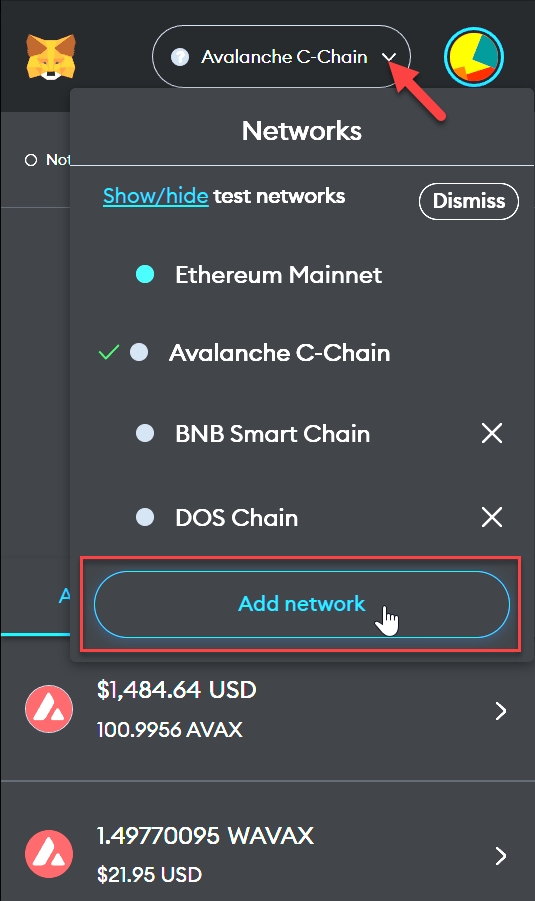
Log in to MetaMask -> Click the Network drop-down -> Select Add network
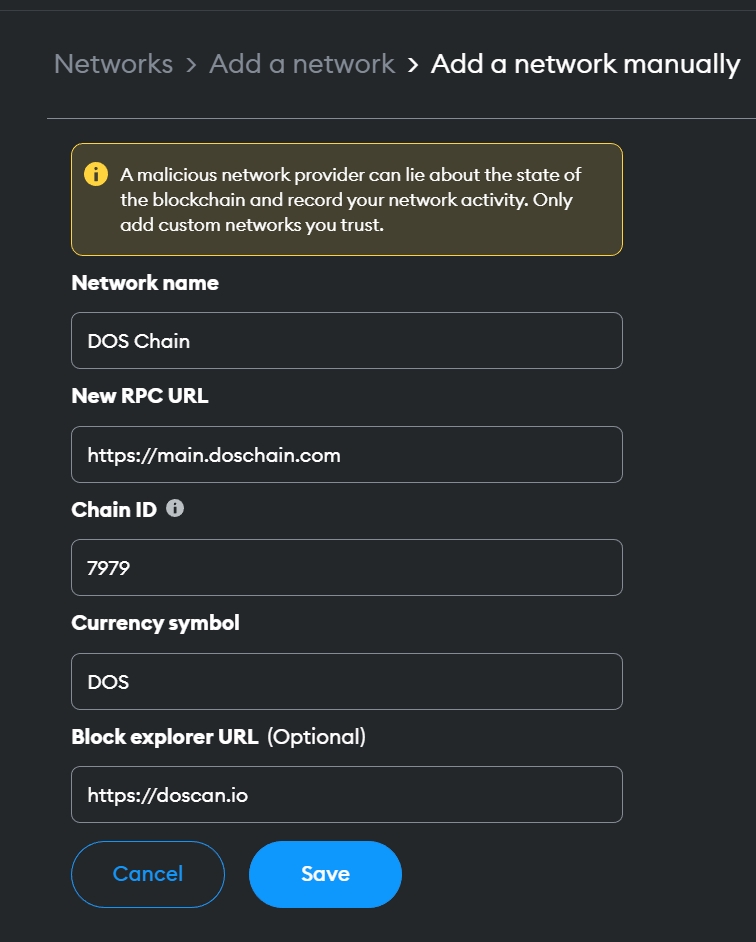
Select Add a network manually
Input DOS Mainnet Information
Network name: DOS Chain
New RPC URL: https://main.doschain.com
Chain ID: 7979
Currency symbol: DOS
Block explorer URL:
chainId: 10162
endpoint: 0x45841dd1ca50265Da7614fC43A361e526c0e6160
chainId: 149
Endpoint: 0x9740FF91F1985D8d2B71494aE1A2f723bb3Ed9E4
Bridging tokens from and to DOS is powered by the . To learn more about it and how to use it in your own project, visit our guide.
Developing a user-friendly wallet poses a major challenge. To address this, we've introduced the DOSafe SDK—a toolkit that streamlines the creation, management, and customization of wallet systems. Ideal for games, marketplaces, or social platforms, DOSafe SDK supports
Explore the live demo of our ecosystem wallet!
Developing a smart wallet system from scratch is a complex challenge. Key tasks include:
Infrastructure Preparation: Set up for transaction sponsorship and bundling.
Signer Implementation: Incorporate signers to manage ownership.
Smart Contract Selection: Choose appropriate smart contracts for accounts.
Authentication Setup: Establish secure authentication processes.
Choosing a third-party provider to manage your system can be a practical decision. However, it is essential for the provider to offer flexibility, allowing adjustments to meet your specific needs and reduce the risk of vendor lock-in. Additionally, prioritize a smooth developer experience to avoid wasting time on implementing complex interactions, like a wallet system.
Here's the cool stuff you get with the DOSafe SDK:
Universal Compatibility: Our solution supports development across browsers, mobile platforms, and Unity.
Effortless Wallet Setup: Users can swiftly create, fund, and start using their wallets.
Efficient User Management: Acts as a gatekeeper, ensuring only authorized users gain access.
The DOSafe SDK is structured like a well-organized kitchen featuring three main stations:
1. Developer Integration Layer: Where you set up your integration
2. Client-Wallet Communication: The service window where orders (transactions) are handled
3. Blockchain Interaction: Where the magic occurs blockchainGetting started
The DOSafe SDK is organized into three main components, each serving a specific purpose, similar to distinct stations in a well-organized kitchen:
Developer Integration Layer: This is where you configure your integration, setting up the necessary components for seamless functionality.
Client-Wallet Communication: This acts as the service window where transactions are initiated and processed.
Blockchain Interaction: This is the core area where blockchain magic happens, managing the intricate operations of
This serves as the main coordinator for your application, managing everything from designing a custom wallet SDK to overseeing pop-ups and transactions. The best part? It operates directly within your app's front end and can be customized with your brand's colors. It also includes built-in security features and integrates seamlessly with
Communication Module
Meet your dedicated maître d', designed to facilitate seamless interactions between clients and their wallets. It assists newcomers with setting up non-custodial wallets and operates smoothly in any browser environment. For more detailed information, please refer to our comprehensive
Framework Prefabs
Similar to ready-to-use recipe cards, our framework prefabs include special helpers for various frameworks, featuring an excellent setup for React. All components are customizable to suit your style.
Imagine this: each app requires a unique setup—installing packages, generating keys in iframes, managing authentication... And then, how do you make it discoverable across different applications?
Authentication gets messy
Every app needs its own bouncer (authentication system)
OAuth2 providers get confused when trying to share wallet access
There's no good way to keep track of who's logged in where
What you get:
One login system that works everywhere (no more authentication headaches!)
Control all permissions from one place
A slick dashboard with your brand to onboard projects
Paymasters and smart accounts by default
Once you’re on the bridge page, locate and click on the “Connect Wallet” button.
Choose the appropriate wallet type from the list.
Follow the prompts to authorize the bridge to interact with your wallet.
Confirm and Send
Review the transaction details thoroughly.
If everything is correct, click on the “Bridge” button to initiate the transaction.
Wait for the transaction to be confirmed on the source network and then on the DOS Chain.
OverMint Admin Proxy
OverMint Fee Manager Proxy


Less control than you'd like
Your partners need access to the master keys (Admin credentials)
It's harder to keep track of who's spending what
No central control room for permissions
One solid security setup for everything


Learn about the native token of DOS Chain.
DOS’s tokenomics are designed at the frontier of economic blockchain and gaming research, aiming to deliver an economic ecosystem and financial plumbing at par with DOS’s innovative engineering design.
This page includes a high-level overview of DOS’s economic model.
DOS Chain’s native asset is called DOS and we generally use one-word "DOS" to distinguish the token from the DOS Chain platform.
The total supply of DOS tokens is capped at 1,000,000,000 (i.e. one billion tokens). A share of DOS’s total supply will be liquid at mainnet launch, with the remaining tokens vesting over the coming years or distributed as future stake reward subsidies. Each DOS token is divisible up to a large number of decimal places.
The DOS token serves four purposes on the DOS Chain:
You can stake DOS to participate in the proof-of-stake mechanism.
While whitelisted games and DApps are gasless, a small amount of DOS is still required as the gas fee to execute and store transactions on the DOS Chain.
DOS can be used as a versatile and liquid asset for various applications including the standard features of money – a unit of account, a medium of exchange, or a store of value – and more complex functionality enabled by smart contracts, interoperability, and composability across the DOS ecosystem.
Since the DOS token is available in finite supply, the same amount of tokens will need to be used across more economic activities in the long run if DOS Chain unlocks many use cases and millions of users migrate to the platform.
10%
6
12
10,000,000
Public Sales
7.0%
70,000,000
25%
3
6
17,500,000
Team & Advisors
15.0%
150,000,000
0%
12
36
0
Ecosystem & Grants
25.0%
250,000,000
10%
0
57
25,000,00
Community
20.0%
200,000,000
5%
0
60
10,000,000
Liquidity & Staking
10.0%
100,000,000
0%
0
12
45,000,000
Treasury
5.0%
50,000,000
0%
12
12
Overall
100.0%
1,000,000,000
10,81%
108,100,000
CATEGORY
Allocation
DOS
TGE Unlock
Cliff (M)
Vesting (M)
Amount at TGE
Seed Round
8.0%
80,000,000
7%
9
18
5,600,000
Private Round
10.0%

100,000,000
This article describes how to run a Mainnet node on DOS Chain. The following necessary steps are needed to run your node on the DOS Chain:
Install AvalancheGo using the Install Script
Download the plugin binary for the DOS Subnet-EVM
Track the DOS Subnet
Connect to the DOS Subnet!
This install script assumes:
AvalancheGo is not running and not already installed as a service
User running the script has superuser privileges (can run sudo)
Official documents from Avalanche:
First, you need to download and install AvalancheGo (handles the orchestration of running Custom VMs). You can follow to complete this step. For this tutorial, we recommend using the AvalancheGo Installer.
Notes: Some configurations you should notice:
Enter your connection type [1,2]: 2
RPC port should be public (this is a public API node) or private (this is a validator)? [public, private]: private
Detected 'x.x.x.x' as your public IP. Is this correct? [y,n]: y
Notes:
Your node should now be bootstrapping. Node configuration file is /home/DOS/.avalanchego/configs/node.json
C-Chain configuration file is /home/DOS/.avalanchego/configs/chains/C/config.json
Plugin directory, for storing subnet VM binaries, is /home/DOS/.avalanchego/plugins
To check that the service is running use the following command (q to exit): sudo systemctl status avalanchego
nodeID Node ID is the unique identifier of the node that you set to act as a validator on the Primary Network.
nodePOP is this node's BLS key and proof of possession. Nodes must register a BLS key to act as a validator on the Primary Network. Your node's POP is logged on startup and is accessible over this endpoint.
publicKey is the 48 byte hex representation of the BLS key.
To get these info:
After building AvalancheGo successfully,
In the Subnet-EVM directory, run the build script, and save it in the “plugins” folder of your .avalanchego data directory. Name the plugin after the VMID of the Subnet you wish to track. The VMID of the DOS Chain is the value beginning with “X5tF...”.
For the steps below, we will assume that you completed first step successfully and are now in your AvalancheGo directory (within your $GOPATH).
Next, you will download the DOS-EVM binary (please notice that we use the same Binary file with the Ava Labs repo):
Download and unzip the latest subnet evm at:
The long string X5tFvg9JwoXgaYPQbceSzhGoCF6dhwrDm5BnAav6meFp3xxmg is the CB58 encoded VMID of the DOS Subnet-EVM. AvalancheGo will use the name of this file to determine what VMs are available to run from the plugins directory.
For a node to join a Subnet, there are two prerequisites:
Primary Network validation
Subnet tracking
Primary Network validation means that a node cannot join a Subnet as a validator before becoming a validator on the Primary Network itself. So, after you add the node to the validator set on the Primary Network, node can join a Subnet.
To have a node start syncing the Subnet, you need to add the --track-subnets command line option, or track-subnets key to the node config file (found at .avalanchego/configs/node.json for installer-script created nodes). A single node can sync multiple Subnets, so you can add them as a comma-separated list of Subnet IDs.
An example of a node config syncing two Subnets:
But that is not all. Besides tracking the SubnetID, the node also needs to have the plugin that contains the VM instance the blockchain in the Subnet will run.
If you want to inspect the process of Subnet syncing, you can use the RPC call to check for the blockchain status.
Example Call:
Example Response:
First, make sure to shut down your node in case it is still running. Then, you will navigate back into the AvalancheGo directory:
If you went through the steps to set up a config file, then you can launch your node by specifying the config file on the command line:
If you want to track the Subnets through the command-line flag. You can append the other flags or even the --config-file flag as well, according to your need.
You firstly import DOS Chain using subnet import public since DOS Chain is already live.
To see the Subnet Config:
avalanche subnet describe "DOS Chain"
DOS Chain allows the node operator to provide some custom configurations. The config file for DOS Chain is located at ~/.avalanchego/configs/chains/22v7AG7h6qaVxd4bLvAsSsg2LZ4RCn5iVYgFn7a2Fj1LCuYwjv/config.json
The content of config.json file should be like:
{ "feeRecipient": "0x50B65C1e3206621b6f9A5Ab2950Ae69f20634b82",//input your wallet }
And finally, share us your nodeID.
You can reduce the node boostraping time by copying the database.
Good way to cut down on bootstrap times on multiple nodes is database copy. Database is identical across nodes, and as such can safely be copied from one node to another. Just make sure to that the node is not running during the copy process, as that can result in a corrupted database. Database copy procedure is explained in detail .
Please make sure you don't reuse any node's NodeID by accident, especially don't restore another node's ID, see for details. Each node must has its own unique NodeID, otherwise, the nodes sharing the same ID will not behave correctly, which will impact your validator's uptime, thus staking rewards, and the stability of your Subnet.
To follow the log use (ctrl-c to stop): sudo journalctl -u avalanchego -f
proofOfPossession is the 96 byte hex representation of the BLS signature.
To ensure optimal functionality, your code editor and project must use the same TypeScript version.
TypeScript Version: Ensure you have TypeScript version 5.0.2 or higher installed.
TS Config Setup:
Set the compilerOptions.moduleResolution to bundler.
Enable Code Splitting: Configure your project to support code splitting for enhanced performance.
This setup will help maintain consistency and leverage TypeScript's latest features efficiently.
In your wallet SDK directory, use your preferred package manager to install the latest Ecosystem SDK version:
npm install @dos.me/wallet-sdk
yarn add @dos.me/wallet-sdk
Import the SDK
import DOSafeSDK from "@dos.me/wallet-sdk";
Initialize the SDK
Create a new instance of the DOSafe SDK with your configuration parameters:
Configuration parameters
The following table describes the configuration parameters for the DOSafe SDK:
Environment URLs
Backend URL (backendUrl)
Development: https://beta.dos.me
Production: https://api.dos.me
Wallet URLs (walletUrl)
Development: https://test-of-wallet.doschain.com
Production: https://wallet.doschain.com
Token configuration (tokens)
The tokens
The following methods are available on the SDK instance:
Open wallet popup
Manually opens the wallet popup interface.
Logout
Disconnects from the wallet and clears the session.
Read from contract
Reads data from a smart contract.
Write to contract
Executes a transaction on a smart contract.
TypeScript support
For TypeScript projects, create a declaration file named dosafe-sdk.d.ts with the following type definitions:
Troubleshooting
Tip: Ensure the
chainDefaultvalue is part of thechainsSupportedarray.
Note: Register ERC-20 token contracts and NFT contracts in the DOSafe system before
curl -X POST --data '{
"jsonrpc":"2.0",
"id" :1,
"method" :"info.getNodeID"
}' -H 'content-type:application/json;' 127.0.0.1:9650/ext/infocd $GOPATH/src/github.com/ava-labs
git clone https://github.com/ava-labs/subnet-evm.gitcd $GOPATH/src/github.com/ava-labs/subnet-evm
./scripts/build.sh ~/.avalanchego/plugins/X5tFvg9JwoXgaYPQbceSzhGoCF6dhwrDm5BnAav6meFp3xxmg{
"public-ip-resolution-service": "opendns",
"http-host": "",
"track-subnets": "nQCwF6V9y8VFjvMuPeQVWWYn6ba75518Dpf6ZMWZNb3NyTA94,Ai42MkKqk8yjXFCpoHXw7rdTWSHiKEMqh5h8gbxwjgkCUfkrk"
}curl -X POST --data '{
"jsonrpc": "2.0",
"method": "platform.getBlockchainStatus",
"params":{
"blockchainID":"22v7AG7h6qaVxd4bLvAsSsg2LZ4RCn5iVYgFn7a2Fj1LCuYwjv"
},
"id": 1
}' -H 'content-type:application/json;' 127.0.0.1:9650/ext/bc/P{
"jsonrpc": "2.0",
"result": {
"status": "Validating"
},
"id": 1
}./build/avalanchego --config-file ~/.avalanchego/configs/node.json./build/avalanchego --track-subnets nQCwF6V9y8VFjvMuPeQVWWYn6ba75518Dpf6ZMWZNb3NyTA94~/.avalanchego$ avalanche subnet import public "DOS Chain"
✔ Mainnet
Provide the path to the genesis file: /home/DOS/.avalanchego/configs/genesis.json
✔ Yes
Please provide an API URL of such a node so we can query its VM version (e.g. http://111.22.33.44:5555): http://20.6.105.146:9650
What is the ID of the blockchain?: 22v7AG7h6qaVxd4bLvAsSsg2LZ4RCn5iVYgFn7a2Fj1LCuYwjv
Getting information from the Mainnet network...
Retrieved information. BlockchainID: 22v7AG7h6qaVxd4bLvAsSsg2LZ4RCn5iVYgFn7a2Fj1LCuYwjv, SubnetID: nQCwF6V9y8VFjvMuPeQVWWYn6ba75518Dpf6ZMWZNb3NyTA94, Name: DOS Chain, VMID: X5tFvg9JwoXgaYPQbceSzhGoCF6dhwrDm5BnAav6meFp3xxmg
✔ Subnet-EVM
Subnet "DOS Chain" imported successfullyavalanche subnet describe "DOS Chain"const walletSDK = new DOSafeSDK({
appName: "Your App Name",
appLogoUrl: "Your App Logo URL",
backendUrl: " Our Authentication Endpoint", // Backend URL
walletUrl: " Our Wallet Endpoint", // Production URL
ecosystemId: "Your Ecosystem ID",
tokens: tokens,
contractNFTs: contractNFTs,
chainsSupported: [43113, 3939],
policies: policyConfigurations,
webPublicKey: "Your_Web_Public_Key",
typeSDK: "popup", // 'sdk' or 'popup'
explorerUrl: "https://testnet.snowtrace.io",
chainDefault: 43113,
});const connectionStatus = await walletSDK.checkWalletDOS();Yes
DOSafe wallet URL for transactions
ecosystemId
Yes
Your ecosystem ID provided by DOSafe
tokens
Yes
Token configuration by chain
contractNFTs
Yes
List of NFT contracts
chainsSupported
Yes
Array of supported chainIds
policies
Yes
Object containing policy IDs by chainId
webPublicKey
Yes
Your web public key for verification
typeSDK
Yes
SDK type ('sdk' or 'popup')
explorerUrl
No
Blockchain explorer URL
chainDefault
Yes
Default chainId to display first
[!IMPORTANT] To obtain policy IDs and register token/NFT contracts in the DOSafe system, contact DOSafe support at [email protected].
Parameter
Required
Description
appName
Yes
Your application name
appLogoUrl
Yes
URL of your application logo
backendUrl
Yes
DOSafe backend URL for authentication
walletUrl
const authResult = await walletSDK.authenticateWalletDOS();const connectResult = await walletSDK.connectWalletDOS();await walletSDK.openPopupWallet();await walletSDK.logout();const data = await walletSDK.readContract(
"0xContractAddress", // Contract address
contractABI, // Contract ABI as array
"functionName", // Function to call
[param1, param2] // Function arguments
);const txResult = await walletSDK.writeContract(
contractAddress, // Contract address
contractABI, // Contract ABI as array
functionName, // Function to call
[param1, param2] // Function arguments
);declare module "@dos/wallet-sdk" {
class DOSafeSDK {
constructor(config: {
appName: string;
appLogoUrl: string;
backendUrl: string;
walletUrl: string;
ecosystemId: string;
tokens: any;
contractNFTs: any;
policies: any;
webPublicKey: string;
chainsSupported: number[];
typeSDK: string;
chainDefault: number;
});
checkWalletDOS(): Promise<any>;
authenticateWalletDOS(): Promise<any>;
connectWalletDOS(): Promise<any>;
openPopupWallet(): Promise<any>;
logout(): Promise<any>;
readContract(
contractAddress: string,
abiContract: any,
functionName: string,
args: any[]
): Promise<any>;
writeContract(
contractAddress: string,
abiContract: any,
functionName: string,
args: any[]
): Promise<any>;
}
export default DOSafeSDK;
}const tokenConfigurations = {
"43113": { // Avalanche Fuji Testnet
"AVAX": {
symbol: "AVAX",
decimals: 18,
contract: "", // Empty for native tokens
provider: "https://avalanche-fuji-c-chain-rpc.publicnode.com",
type: "native",
abi: [],
},
"SECOND": {
symbol: "SECOND",
decimals: 18,
contract: "0x10627F7D8117c4BdB9409813b47da5B21CAB5F9b",
provider: "https://avalanche-fuji-c-chain-rpc.publicnode.com",
type: "erc20",
abi: [],
},
},
"3939": { // DOS Chain Testnet
"DOS": {
symbol: "DOS",
decimals: 18,
contract: "",
provider: "https://test.doschain.com",
type: "native",
abi: [],
},
"SECOND": {
symbol: "SECOND",
decimals: 18,
contract: "0x17a11Dd7095555E26275F2DE38Ba4548229f5bbc",
provider: "https://test.doschain.com",
type: "erc20",
abi: [],
},
}
};
NFT configuration (contractNFTs)
The contractNFTs parameter accepts an array of objects:
const nftConfigurations = [
{
chainId: 43113,
contract: "0x7979c2815CD58184Bd91082CDe5E001f18b22368",
abi: [],
},
{
chainId: 3939,
contract: "0x5f33e2db1448933f8e3B5a630E01D8E357bFe62F",
abi: [],
}
];
Policy configuration (policies)
The policies parameter requires an object mapping chain IDs to policy identifiers:
const policyConfigurations = {
"43113": "pol_avalanche_policy_id",
"3939": "pol_dos_chain_policy_id",
};